It’s funny what you find when you freeze-frame scenes….


It’s funny what you find when you freeze-frame scenes….

If anyone tells you “You can’t achieve your goal”, just remember that there is only one person who can tell you what you can and can’t do — and that person is yourself.
With the right incentive and motivation, a human can do many wonderful things. I’ve seen this video many times, and always come back to it whenever I feel a dip in motivation. If he can do it, so can I.

After a lot of tinkering and configuring, I’ve got my HTC Sensation onto Android 4.4.2 (KitKat). The ROM is not registering updates so I’ll manually have to keep checking on the XDA forums.
I like the new interface changes, the sliding notification ribbon, and the way the whole thing seems to run quicker than Jelly Bean. Made some backups of the new versions of the apps, and installed the newer version of TWRP. I was right, and that I was behind by several releases.
The only thing that’s gone funny right now, is my local profile that is displayed on the interface is corrupted. Here’s my build screen:
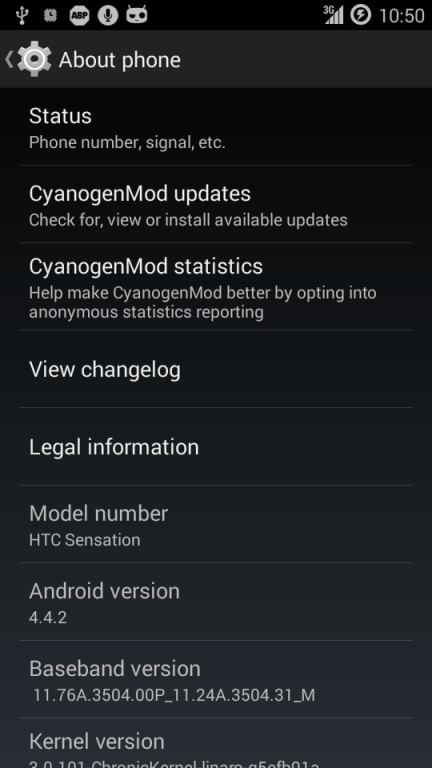

I’ve been contemplating flashing my phone since the guys at Cyanogenmod haven’t released any new ROM versions since 2013. Looking around on the XDA forums, I’ve found plenty of releases by other people and teams, some of which are the new KitKat version. So I downloaded and put those on my phone, but learning from past mistakes, I made sure I had a backup. My recovery is the TWRP, so I did a backup on that tool, then flashed the ROM. It booted up fine, but got loads of FCs, so I went back and restored my backup. Or so I thought. Going back into my pre-KitKat ROM, left me with a factory-resetted version of a good ROM. So I can to reconnect my Google accounts, install Titanium Backup and its key, then restore my backups from Titanium. Seriously, buy Titanium Backup, it will save you HOURS of time redownloading, reinstalling, and reconfiguring your applications.
So now, I’m running my application restores, then I’m going to reboot and check it all works, then download and install the latest TWRP recovery (I suspect mine might be out of date since I haven’t used it for a long while), and do another backup, then try again.

I’m one of those people who hates having to shutdown machines, then restart them, and start logging into all my sites all over again, so I’m particularly thankful for hibernation functionality.
On Ubuntu (possibly Debian as well, but I haven’t checked), you can install either (or both) of the hibernate package, or the TuxOnIce-enabled kernel.
Hibernate is a script that detects whether or not you have a TOI-enabled kernel, and if you have such a kernel, it will use the TOI routines.
Hibernate worked perfectly for me, until I started using BOINC. Then, hibernation would hang with my laptop in a “limbo” state. Neither fully on, nor fully powered off. Turns out that BOINC must be either hogging the memory, or not releasing it properly. So, instead of doing
sudo hibernate
I do this
sudo service boinc-client stop

sudo hibernate -k

sudo service boinc-client start
So I stop the BOINC service (freeing up memory and CPU cycles), then I do the hibernate (allowing it to kill processes if needed), and then I startup the BOINC service again. The last line only gets executed upon resuming.

Just made some updates to my Zombies, Run 2 Google Music FAQ.

The ICO’s investigation found that Kent Police had no guidance or procedures in place to makes sure personal information was securely removed from former premises. The problem was made worse due to an apparent breakdown in communications between the various departments involved in the move.<
ICO Head of Enforcement, Stephen Eckersley, said:
“If this information had fallen into the wrong hands the impact on people’s lives would have been enormous and damaging. These tapes and files included extremely sensitive and confidential information relating to individuals, many of whom had been involved in serious and violent crimes. How a police force could leave such information unattended in a basement for several years is difficult to understand.“Ultimately, this breach was a result of a clear lack of oversight, information governance and guidance from Kent Police which led to sensitive information being abandoned. It is only good fortune that the mistake was uncovered when it was and the information hasn’t fallen into the wrong hands.”
Kent Police fined £100,000 after interview tapes abandoned at former station | ICO news release.

I’ve started looking at the iptables function within the Linux kernel, and found out, that with a bit of tinkering, you can use the IBLOCK lists to do a machine-wide block based on IP. You use pipes (gotta love ’em) to route them into ipset which allows you to create a set of IP addresses/ranges which then reference in the iptables. You can use wget or curl. If you use wget, you might need to use the quiet switch. You can use xargs to multi-download lists and concatenate. I’m tinkering with my download script at the moment.
First, create the set. Here, I have used a high maxelem number because I use a lot of IBLOCK’s lists. The “maxelem 1048576” can be omitted or the number reduced if you are only using one or a small number of IBLOCK lists.
ipset create IBLOCK hash:net maxelem 1048576
Second, download and add to the set if it doesn’t already exist. You can chain multiple lists into the wget or use xargs. For this example, I’m only using one.
wget -q "http://list.iblocklist.com/?list=bt_level1&fileformat=p2p&archiveformat=gz" -O- |
    gunzip |
    cut -d: -f2 |
    grep -E "^[-0-9.]+$" |
    gawk '{print "add IBLOCK "$1}' |
    ipset restore -exist
Finally, add rules into the iptables to drop package to and from IP addresses that exist in the set. This means that packets coming in from external IPs that match IP addresses in the set will not be answered.
iptables -I INPUT -m set --match-set IBLOCK src -j DROP
iptables -I OUTPUT -m set --match-set IBLOCK dst -j DROP
When I tried this with my IBLOCK download script, it seemed to kill TOR functionality as well, which I suspect means that IBLOCK have included the TOR IP range in one or more of their lists, so I’ll need to determine which one(s) they are and exclude them, as I do use TOR actively.
As with most things, there’s more than one way to do this, and this is one of many ways you could implement blocking behaviour.
Source: Dustin C. Hatch, Using PeerBlock lists on Linux


You must be logged in to post a comment.