My TV looks like it’s on the fritz and we’re going to have to buy a new one soon. So here’s a little something to chuckle over. Note the cameo from Mr. Old Spice.
My TV looks like it’s on the fritz and we’re going to have to buy a new one soon. So here’s a little something to chuckle over. Note the cameo from Mr. Old Spice.

If you use this app on Android, like I do, you might be interested to know you can rip the audio from the game very easily. The audio is stored on the sdcard which you can access using ADB or plugging your device into your computer and browsing to
/Android/obb/com.sixtostart.zombiesrun
In this folder are two files:
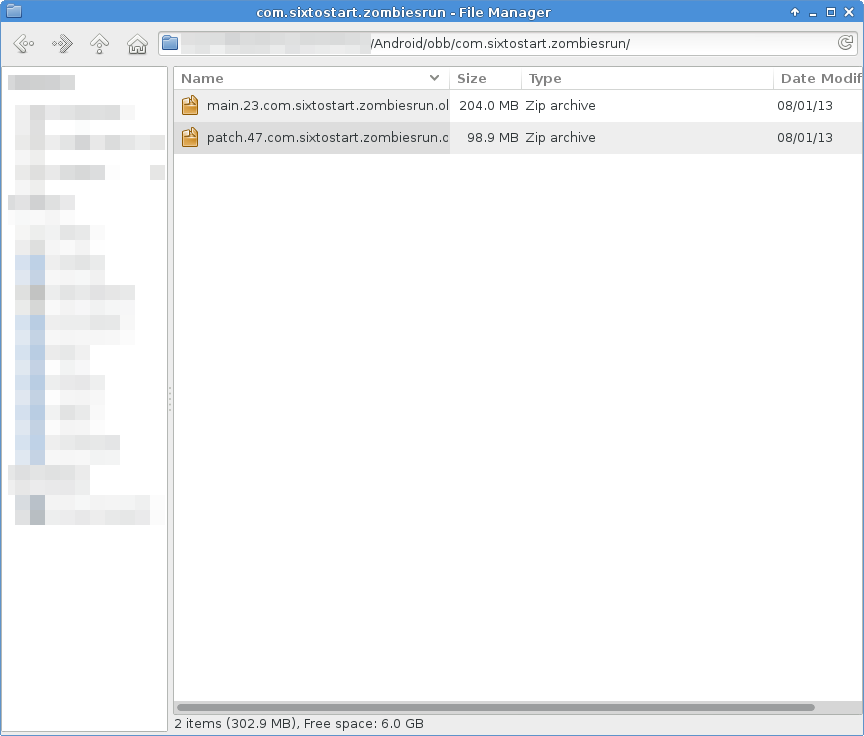
One contains the main audio, the other contains the additional missions (Supply Runs, etc.) and the radio audio clips. Extract them both to a folder (they’re ZIP files, even though they have a .obb extension), and you’ll get MP3 audio files.

ZR track here
Whoo! Nearly hit 100% on this run, and it was a long run too. I had ONE blip in this run near the end of the Green Zone, which took the 2% off, and I pre-empted the 5-minute mark by starting to slow-jog at the Blue Zone, even though I can walk it.
Day 16’s image isn’t available, not sure why, even though I synced my pacer. Most likely it’s because I ended up running a workout that was deleted.

ZR track here
Trying to use the ASICS application was a nightmare. There’s no audio and no indicator to tell you when you are too fast or too slow compared to the guideline pace. There’s no way to even know whether you have HIT the guideline pace either. Used it for about 2 minutes before giving up on it. I’ve logged a suggestion to ASICS about that.
I’ve switched back to miCoach training, but since I stopped the place, I’ve had to restitch my plan from where I left off, and for some reason, the plan won’t sync up properly with the previous runs, so now I’m continuing with workout # 19 (Saturday) instead of 17.

I’ve just found out that ASICS (whom all my running gear is from) also have a mobile app and training plans, including plans for various distances and paces. And yes, Half Marathon is included in them.
I’m going to switch off miCoach for a bit and try out the ASICS plan. They have structured the plan into phases to add variety to the plan and I like that because you can see exactly what phase you are in and keep yourself motivated. Unlike the training I was doing via miCoach, this one, like most mobile/web training plans, is pace-oriented.

I have been wanting to upgrade my laptop for a long while but have been putting off. Now my decision has somewhat been pushed. I’ll need to upgrade it to handle some of my work from the office and the software I need to use is really going to struggle on my current hardware.

Grive is an open source command-line-based sync tool to synchronise a directory with your Google Drive. Grive is not in the Fedora repositories, although it is undergoing review for addition into the repositories.
In the meantime, if you want to use it, I’ve written a script that should pick the latest version from the russianfedora website. Bitbucket repository is here.
Direct link to script: here
Once you install the application, create a blank folder (this will be the sync folder), then run
grive -a
to request an authentication URL. Go to that URL, log into Google if you need to, and you’ll get a response string you need to copy back into the console window. If the authentication was successful, Grive will sync your files into the folder. Each subsequent time you run Grive, it will download and/or upload files to/from your Google Drive.
There is only one limitation that I’m aware of. Documents created from within Google Drive won’t sync, but if you convert them to odt or doc files, they will sync.

An interesting use for Blender


ZR track here
Threshold run. This was really difficult today, for some reason. I couldn’t get my heart rate up to yellow zone, even though I was pushing myself.


You must be logged in to post a comment.