Week 5 runs starting. 5 minutes, 3 times and a 3min break in between.
Last night hardly got any sleep, and this morning, when I checked the weather, it wasn’t surprising with 89% humidity according to Google and weather.com


Week 5 runs starting. 5 minutes, 3 times and a 3min break in between.
Last night hardly got any sleep, and this morning, when I checked the weather, it wasn’t surprising with 89% humidity according to Google and weather.com

I posted this a while ago.
But given I’ve had my uncle lose his fight for life, and my uncle’s mother-in-law also lose her fight for life, I wanted to reference this article again. This article might be about speeding, but there’s an important point within in — you have a chance to speak to your family. To your loved ones. Right now. Talk to them, call them, write to them. You have no idea whether they will be around tomorrow — or you, for that matter.
Some chronic speeders were, and found the result very difficult to handle.
Turn on captions for other languages.

Another early morning run today. No stopping during the four run intervals so that felt good :)


Haven’t run for a while so picked up on my C25K training where I left off.
Maybe slower than previous, but made it most of the way — dropped to a walk early on run #4


I had my cousin and his girlfriend over here in the UK for a couple of days for his graduation ceremony — something, no-one mentioned in advance so I ended up having to take a couple of days out of the office and working from home. Several long days later, and my lack of sleep was catching up with me, along with the 30 deg C heat wasn’t helping. They booked out of Gatwick rather than heathrow, meaning the trip to the airport took 1.5 hours instead of 1 hour. And meant I pretty much did an entire lap of the M25 in the process (about 75 miles there and 75 miles back, though I drove 80 miles there instead because the M25 was closed one way, so I had to turn back).
They picked an early flight, which meant we had to try to get there for about 7am, meaning we had to leave at 5am, which in turn meant a 4am get up so they could shower, finish packing and get into the car.
I was back home by 8:15, even stopping off at my local supermarket to pick up some bottled water – although the supermarket wasn’t open due to it being a Sunday, so I picked it up from a local Tesco petrol station instead (15p more expensive than a Tesco supermarket)
I was pretty tired for most of the day, so did washing, ironing, and then went to bed at 6pm — yeah, never went to bed that early before, but here’s FitBit to prove it. 12 hours in bed, 9.5 hours asleep.
 Also, during my cousins visit, I took him around different food places. Now I know people like food pictures (aka food porn), here’s a couple of the pics


You may have known I really hate my broadband speeds. I’ve replaced the ADSL filters, the phone extension coil and the router, and was still getting barely 1Mb on a 4Mb connection from Sky.
The only cable I hadn’t yet replaced was the cable that went from my router to the extension coil. Without hoping for much, I spent £2 and got a “high quality” (always be careful with any listing that says that) so I decided to buy two while I was at it.
It arrived and I swapped out the cable. Then tested it.
Well….
The router claims connection speed as 7007 kbps down and 921 kbps up.
Ookla says:
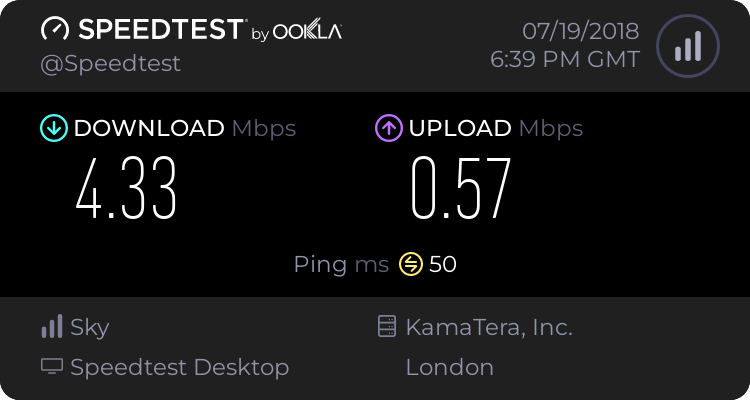
An improvement over barely 1Mbps, but still below the 7007 kbps down claimed by the router….

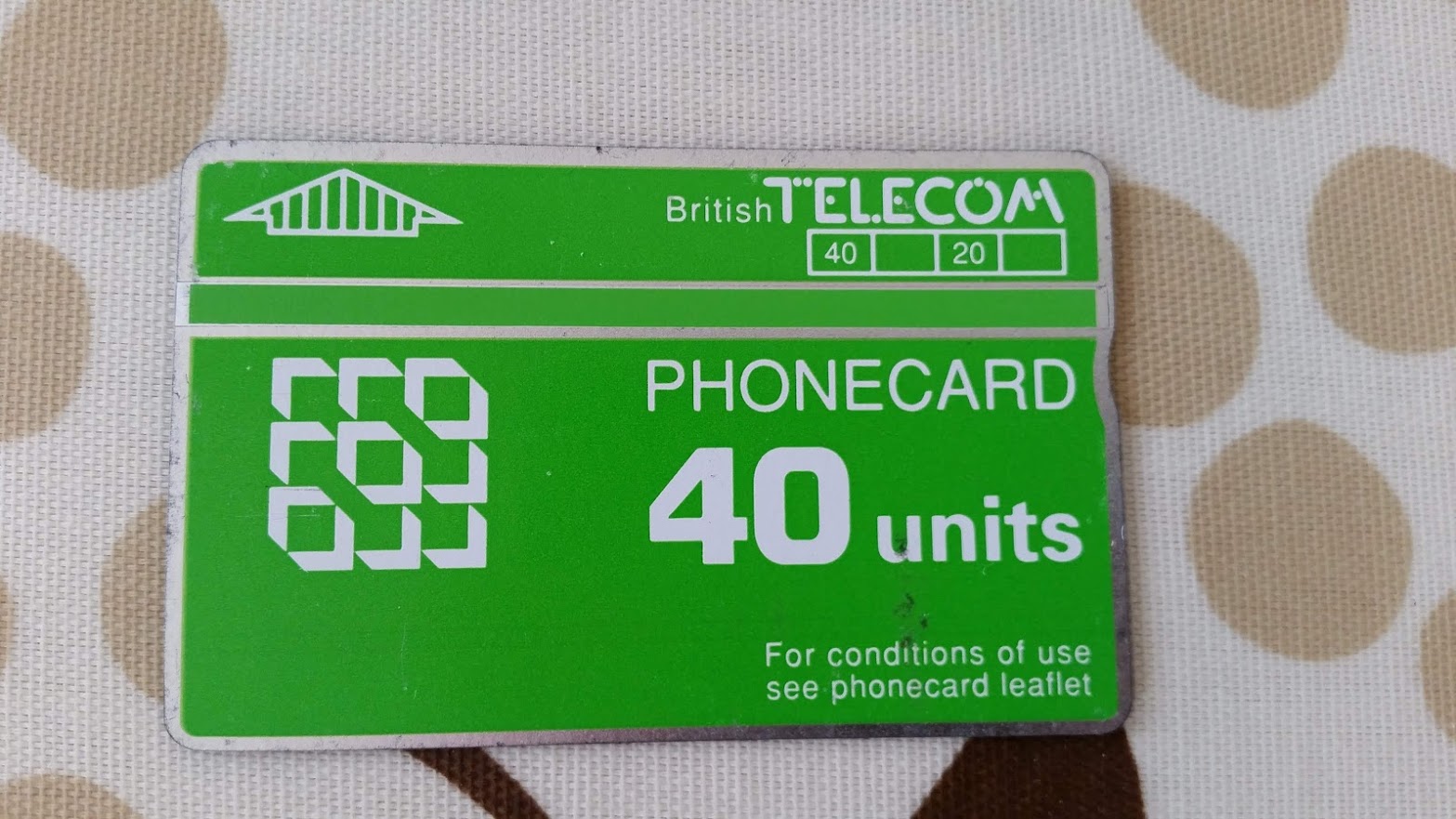
Who out there remembers these from @bt_uk?
Back before phones took credit cards and before mobile phones were a thing, we had to pre-purchase credit using these cards.
And I think this one is still unused :D

In the old days, an off-peak, Zones 1-6 Travelcard would cost you £3.10
Don’t believe me? Here’s one from 1991
The equivalent ticket today would cost you £12.70, or £12.50 on Oyster….
Yes, this is a 27-year-old Travelcard…

Today’s temperature was 30degC according to Google….

And I did my C25K runs in this heat….


Suppose you have an application you are deploying to your kubernetes cluster. For most purposes, running kubectl rollout history deployments/your-app will give you a very simple revision history.
$ kubectl rollout history deployments/awesome-app
REVISION  CHANGE-CAUSE
1         <none>
However, what if you had multiple deployments by different people. How would you know what was the reason for the deployment? Especially when you have something like this?
REVISION  CHANGE-CAUSE
1         <none>
2
3
4
5
...
...
100       <none>
101       <none>
102       <none>
It is possible to set a value into the change-cause field via an annotation, but that field is quite volatile, it is also filled/replaced if someone uses the --record flag when doing an apply. However, it can be utilised to make it much more useful:
REVISION  CHANGE-CAUSE
11        Deploy new version of awesome-app to test environment
12        Deploy new version of awesome-app to staging environment
13        Deploy new version of awesome-app, Thu 21 Jun 07:01:03 BST 2018
14        Deploy new version of awesome-app with integration to gitlab v0.0.0 [test]
How is this done? Pretty simply, actually. here’s a snippet from the deploy script I use.
echo Deploy message?
read MESSAGE
if [ -z "$MESSAGE" ]; then
  MESSAGE="Deploy new version of awesome-app, $(date)"
  echo Blank message detected, defaulting to \"$MESSAGE\"
fi
echo Deploy updates...
cat deploy.yaml | sed s/'SUB_TIMESTAMP'/"$(date)"/g | kubectl replace -f -
kubectl annotate deployment awesome-app kubernetes.io/change-cause="$MESSAGE" --record=false --overwrite=true
kubectl rollout status deployments/awesome-app
kubectl rollout history deployment awesome-app
For lines 1 to 6, I read in a message from the terminal to populate the annotation, and if nothing is provided, a default is used.
On line 8, I replace the timestamp to trigger a change to the deployment (this can be anything, for example, changing the version tag of your docker image from awesome-app:release-1.0 to awesome-app:release-1.1)
Note that I used replace and not apply — replace will reset the deployment declaration, and since my deploy yaml does NOT contain a change-cause annotation, replace will remove the annotation.
On line 9, I annotate the deployment, making sure I don’t record it and overwrite the annotation in the event it’s there already (though those two switches might be redundant)
On line 10 I check the status of the rollout — this blocks until it is complete
On line 11, I then dump the deployment history.
This is an example of a script run:
$ ./deploy.sh
Deploy message?
[typed] Deploy new version of awesome-app with gitlab integration v0.0.0 [test]
Deploy updates...
deployment "awesome-app" replaced
deployment "awesome-app" annotated
Waiting for rollout to finish: 1 old replicas are pending termination...
deployment "awesome-app" successfully rolled out
deployments "awesome-app"
REVISION  CHANGE-CAUSE
11        Deploy new version of awesome-app, Thu 21 Jun 07:00:19 BST 2018
12        Deploy new version of awesome-app, Thu 21 Jun 07:00:52 BST 2018
13        Deploy new version of awesome-app, Thu 21 Jun 07:01:03 BST 2018
14        Deploy new version of awesome-app with integration to gitlab v0.0.0 [test]


You must be logged in to post a comment.