If tablet doesn’t boot, use cold boot option (hold down, don’t go into recovery, confirm cold boot)
To fix problem, in terminal:
su

echo boot | dd of=/dev/block/mmcblk0p3 bs=1 seek=0
If tablet doesn’t boot, use cold boot option (hold down, don’t go into recovery, confirm cold boot)
To fix problem, in terminal:
su
echo boot | dd of=/dev/block/mmcblk0p3 bs=1 seek=0

If you are like me and regularly copy music files to your device, you’ll know that some applications only work with playlists, especially fitness apps like Zombies, Run! and miCoach. But these apps use the media storage playlists, so you need to create the playlists in a certain way. I’ve generate a script below. It searches for any files ending in flac or mp3 (common audio formats), and then generates them into an m3u playlist. It prefixes the output with /sdcard/Music (which is commonly where music files go), but this can be changed.
Copy your music to /sdcard/Music/
Copy the script to the same folder.
Change directory into the folder.
Run this script using the line:
playlistmaker.sh .
And you will get a file ALL.m3u
if [ -f "$1.m3u" ]; then

echo Removing $1.m3u

rm "$1.m3u"

fi

OUTPLS="$1.m3u"

if [[ "$1" = "." ]]; then

OUTPLS=ALL.m3u

fi

echo Building "$OUTPLS"

find "$1" | grep -E ".flac$|.mp3$" | sort | sed -r "s/^(.\/)/\/sdcard\/Music\//" >"$OUTPLS"

SONGS=
wc -l "$OUTPLS" | awk '{print $1}'
if [[ $SONGS -eq 0 ]]; then
echo “$OUTPLS: ($SONGS songs), not keeping playlist”
rm “$OUTPLS”
else
echo “$OUTPLS: ($SONGS songs)”
fi
This script can also be tied together with a tree walker like so:
find -maxdepth 1 -type d -exec ./findMusicFiles.sh {} \;
The script at the start of this post will generate one playlist – ALL.m3u containing all the media in the current directory and below.
Using the second line of code will walk the directories in the current folder and generate one playlist per directory.

Just made some updates to my Zombies, Run 2 Google Music FAQ.

After a lot of tinkering and configuring, I’ve got my HTC Sensation onto Android 4.4.2 (KitKat). The ROM is not registering updates so I’ll manually have to keep checking on the XDA forums.
I like the new interface changes, the sliding notification ribbon, and the way the whole thing seems to run quicker than Jelly Bean. Made some backups of the new versions of the apps, and installed the newer version of TWRP. I was right, and that I was behind by several releases.
The only thing that’s gone funny right now, is my local profile that is displayed on the interface is corrupted. Here’s my build screen:
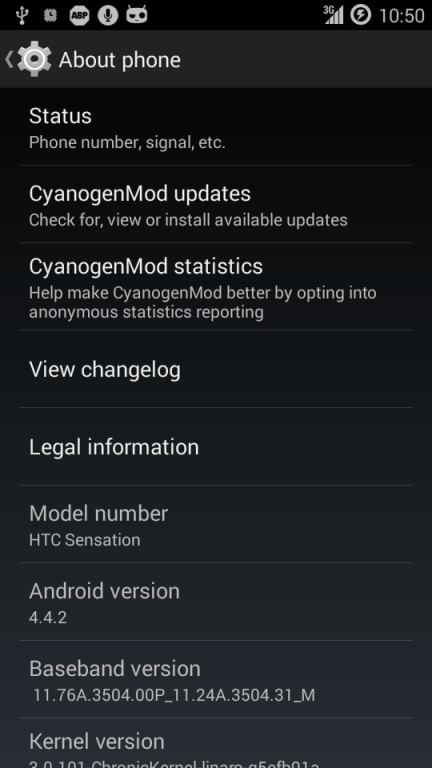

I’ve been contemplating flashing my phone since the guys at Cyanogenmod haven’t released any new ROM versions since 2013. Looking around on the XDA forums, I’ve found plenty of releases by other people and teams, some of which are the new KitKat version. So I downloaded and put those on my phone, but learning from past mistakes, I made sure I had a backup. My recovery is the TWRP, so I did a backup on that tool, then flashed the ROM. It booted up fine, but got loads of FCs, so I went back and restored my backup. Or so I thought. Going back into my pre-KitKat ROM, left me with a factory-resetted version of a good ROM. So I can to reconnect my Google accounts, install Titanium Backup and its key, then restore my backups from Titanium. Seriously, buy Titanium Backup, it will save you HOURS of time redownloading, reinstalling, and reconfiguring your applications.
So now, I’m running my application restores, then I’m going to reboot and check it all works, then download and install the latest TWRP recovery (I suspect mine might be out of date since I haven’t used it for a long while), and do another backup, then try again.

Just made some updates to my Zombies, Run 2 Google Music FAQ.


One of Android KitKat\’s new features is a way for developers to easily make video recordings with the SDK, but what about every day users? After previously demonstrating display streaming software, CyanogenMod developer Koushik Dutta has released a new beta app in the Play Store (join the Google+ Community first for access) that simplifies the process. It does require users to be on one of the latest nightly builds of CyanogenMod 11 to work, but once loaded it can make recording a video of one\’s screen just as simple as taking a screenshot. As demonstrated in a video (embedded after the break), users can even activate it with the volume up + power combo on a Nexus 5, just like the volume down + power button that takes a screenshot.
If you\’re not on CyanogenMod there is still hope however, as Dutta revealed over the weekend that he has it working on any rooted device running Android 4.4.1, and may have a way for it to operate even on hardware that\’s not rooted. Koush has been a busy guy lately, also revealing that Google may add Android-to-Chromecast mirroring soon and releasing a new version of his media streaming AllCast app, we almost feel bad about hoping the Cast SDK adds on a few new opportunities.
via CyanogenMod 11 Screencast video recording is as easy as taking a screenshot.

Although Dungeon Defenders can still be installed off Play, it is not possible to install the additional data files needed to run it, so you can’t play it any longer. There was, for a while at least, a beta of the next DD game, but I didn’t catch it in time.

Making progress now in the game. Finally hit my first PvP area. Haven’t tried it yet, though. In addition, I’ve finally decided to try the Blood Arena area. I can get a few monsters in, but die pretty quickly. Some of the monsters there are quite tough. Others, fall quite easily. The more often and better I fight in the arena, the better my score, and the better the prizes I collect at the end of the week.




You must be logged in to post a comment.