My disdain of Facebook is no secret, and now AllTime10s has put out a video listing 10 reasons why.
My disdain of Facebook is no secret, and now AllTime10s has put out a video listing 10 reasons why.

So I haven’t been posting here much recently so here are some updates.
Been slowing trying to get back into running, have been slacking off WAAAAY too much lately. Tried using Aaptiv (@aaptiv) which is a training fitness app that has trainers talking you through the stuff, there are a few problems with it.
On a separate note, I have bought another attempt at the CKA exam, but this time bought the bundle with the Kubernetes Fundamentals Training from Linux Foundation. Let’s see how different that is to Linux Academy’s training….

The biggest bombshell news in tech recently was that RedHat are being bought by IBM. And in one of the WhatsApp groups I’m in, someone posted this:


I took my CKA exam for the second time — and failed again. This time. however got much closer to the pass mark than my first time.
Things I think I fluffed on:
Cluster DNS
pods, services and how they can show up using nslookup. I got caught up in trying to figure out why my DNS wasn’t working, and I think it’s because I was trying to nslookup from outside the cluster, which obviously would not resolve the “.cluster.local” domain correctly. I forgot that you can do an interactive, in-cluster shell using
kubectl run -i --tty busybox --image=busybox -- sh
Not to mention that doing nslookup {service}.svc.cluster.local won’t work, and you have to use -type=a to nslookup to get the ip address of the service to confirm it is resolving
etcd Snapshots
This got me both times. The first time I had no idea why doing a snapshot command was failing. The second time I figured out how to do the backup and how to invoke it from the pod, but still got it wrong. Now I figured out (and it was right in front of my face):
<br />WARNING:
Environment variable ETCDCTL_API is not set; defaults to etcdctl v2.
Set environment variable ETCDCTL_API=3 to use v3 API or ETCDCTL_API=2 to use v2 API.

USAGE:
etcdctl [global options] command [command options] [arguments...]

VERSION:
3.2.18
I wasn’t using the ETCDCTL_API variable beforehand so it was falling back to V2 api, which doesn’t have the snapshot command:
<br /># etcdctl
NAME:
etcdctl - A simple command line client for etcd.

WARNING:
Environment variable ETCDCTL_API is not set; defaults to etcdctl v2.
Set environment variable ETCDCTL_API=3 to use v3 API or ETCDCTL_API=2 to use v2 API.

USAGE:
etcdctl [global options] command [command options] [arguments...]

VERSION:
3.2.18

COMMANDS:
backup backup an etcd directory
cluster-health check the health of the etcd cluster
mk make a new key with a given value
mkdir make a new directory
rm remove a key or a directory
rmdir removes the key if it is an empty directory or a key-value pair
get retrieve the value of a key
ls retrieve a directory
set set the value of a key
setdir create a new directory or update an existing directory TTL
update update an existing key with a given value
updatedir update an existing directory
watch watch a key for changes
exec-watch watch a key for changes and exec an executable
member member add, remove and list subcommands
user user add, grant and revoke subcommands
role role add, grant and revoke subcommands
auth overall auth controls
help, h Shows a list of commands or help for one command

GLOBAL OPTIONS:
--debug output cURL commands which can be used to reproduce the request
--no-sync don't synchronize cluster information before sending request
--output simple, -o simple output response in the given format (simple, `extended` or `json`) (default: "simple")
--discovery-srv value, -D value domain name to query for SRV records describing cluster endpoints
--insecure-discovery accept insecure SRV records describing cluster endpoints
--peers value, -C value DEPRECATED - "--endpoints" should be used instead
--endpoint value DEPRECATED - "--endpoints" should be used instead
--endpoints value a comma-delimited list of machine addresses in the cluster (default: "http://127.0.0.1:2379,http://127.0.0.1:4001")
--cert-file value identify HTTPS client using this SSL certificate file
--key-file value identify HTTPS client using this SSL key file
--ca-file value verify certificates of HTTPS-enabled servers using this CA bundle
--username value, -u value provide username[:password] and prompt if password is not supplied.
--timeout value connection timeout per request (default: 2s)
--total-timeout value timeout for the command execution (except watch) (default: 5s)
--help, -h show help
--version, -v print the version

# ETCDCTL_API=3 etcdctl
NAME:
etcdctl - A simple command line client for etcd3.

USAGE:
etcdctl

VERSION:
3.2.18

API VERSION:
3.2

COMMANDS:
get Gets the key or a range of keys
put Puts the given key into the store
del Removes the specified key or range of keys [key, range_end)
txn Txn processes all the requests in one transaction
compaction Compacts the event history in etcd
alarm disarm Disarms all alarms
alarm list Lists all alarms
defrag Defragments the storage of the etcd members with given endpoints
endpoint health Checks the healthiness of endpoints specified in `--endpoints` flag
endpoint status Prints out the status of endpoints specified in `--endpoints` flag
watch Watches events stream on keys or prefixes
version Prints the version of etcdctl
lease grant Creates leases
lease revoke Revokes leases
lease timetolive Get lease information
lease keep-alive Keeps leases alive (renew)
member add Adds a member into the cluster
member remove Removes a member from the cluster
member update Updates a member in the cluster
member list Lists all members in the cluster
snapshot save Stores an etcd node backend snapshot to a given file
snapshot restore Restores an etcd member snapshot to an etcd directory
snapshot status Gets backend snapshot status of a given file
make-mirror Makes a mirror at the destination etcd cluster
migrate Migrates keys in a v2 store to a mvcc store
lock Acquires a named lock
elect Observes and participates in leader election
auth enable Enables authentication
auth disable Disables authentication
user add Adds a new user
user delete Deletes a user
user get Gets detailed information of a user
user list Lists all users
user passwd Changes password of user
user grant-role Grants a role to a user
user revoke-role Revokes a role from a user
role add Adds a new role
role delete Deletes a role
role get Gets detailed information of a role
role list Lists all roles
role grant-permission Grants a key to a role
role revoke-permission Revokes a key from a role
check perf Check the performance of the etcd cluster
help Help about any command

OPTIONS:
--cacert="" verify certificates of TLS-enabled secure servers using this CA bundle
--cert="" identify secure client using this TLS certificate file
--command-timeout=5s timeout for short running command (excluding dial timeout)
--debug[=false] enable client-side debug logging
--dial-timeout=2s dial timeout for client connections
--endpoints=[127.0.0.1:2379] gRPC endpoints
-h, --help[=false] help for etcdctl
--hex[=false] print byte strings as hex encoded strings
--insecure-skip-tls-verify[=false] skip server certificate verification
--insecure-transport[=true] disable transport security for client connections
--key="" identify secure client using this TLS key file
--user="" username[:password] for authentication (prompt if password is not supplied)
-w, --write-out="simple" set the output format (fields, json, protobuf, simple, table)
And then I can run
ETCDCTL_API=3 etcdctl snapshot save snapshot.db --cacert=/etc/kubernetes/pki/etcd/ca.crt --cert=/etc/kubernetes/pki/etcd/healthcheck-client.crt --key=/etc/kubernetes/pki/etcd/healthcheck-client.key
To create the snapshot.
Certificate Rotation
I need to look this one up — I had no idea how to rotate the certificates
Static Pods
I’d never directly dealt with static pods before this exam, and I don’t think I had this question in my first run, so it was one I didn’t know the answer do. A bit of hunting on the k8s side led me to figure out it was a static pod question, but I couldn’t find out where the exam cluster was looking for its static pod manifests. The question told me a directory, but my yaml didn’t seem to be picked up by the kubelet.
Final note
Generally, a lot of the questions from my first exam run showed up again in this run, which let me run through over half of the exam fairly quickly. I thought I was going to do better than my first run, and I did, but not by much.

I had my cousin and his girlfriend over here in the UK for a couple of days for his graduation ceremony — something, no-one mentioned in advance so I ended up having to take a couple of days out of the office and working from home. Several long days later, and my lack of sleep was catching up with me, along with the 30 deg C heat wasn’t helping. They booked out of Gatwick rather than heathrow, meaning the trip to the airport took 1.5 hours instead of 1 hour. And meant I pretty much did an entire lap of the M25 in the process (about 75 miles there and 75 miles back, though I drove 80 miles there instead because the M25 was closed one way, so I had to turn back).
They picked an early flight, which meant we had to try to get there for about 7am, meaning we had to leave at 5am, which in turn meant a 4am get up so they could shower, finish packing and get into the car.
I was back home by 8:15, even stopping off at my local supermarket to pick up some bottled water – although the supermarket wasn’t open due to it being a Sunday, so I picked it up from a local Tesco petrol station instead (15p more expensive than a Tesco supermarket)
I was pretty tired for most of the day, so did washing, ironing, and then went to bed at 6pm — yeah, never went to bed that early before, but here’s FitBit to prove it. 12 hours in bed, 9.5 hours asleep.
 Also, during my cousins visit, I took him around different food places. Now I know people like food pictures (aka food porn), here’s a couple of the pics


You may have known I really hate my broadband speeds. I’ve replaced the ADSL filters, the phone extension coil and the router, and was still getting barely 1Mb on a 4Mb connection from Sky.
The only cable I hadn’t yet replaced was the cable that went from my router to the extension coil. Without hoping for much, I spent £2 and got a “high quality” (always be careful with any listing that says that) so I decided to buy two while I was at it.
It arrived and I swapped out the cable. Then tested it.
Well….
The router claims connection speed as 7007 kbps down and 921 kbps up.
Ookla says:
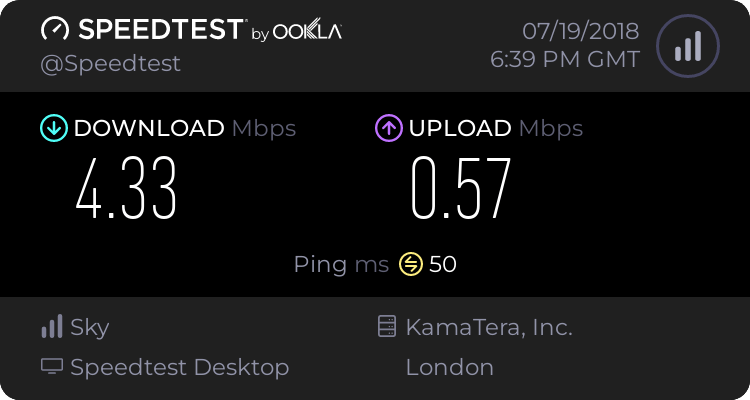
An improvement over barely 1Mbps, but still below the 7007 kbps down claimed by the router….

Who out there remembers these from @bt_uk?
Back before phones took credit cards and before mobile phones were a thing, we had to pre-purchase credit using these cards.
And I think this one is still unused :D



Suppose you have an application you are deploying to your kubernetes cluster. For most purposes, running kubectl rollout history deployments/your-app will give you a very simple revision history.
$ kubectl rollout history deployments/awesome-app
REVISION  CHANGE-CAUSE
1         <none>
However, what if you had multiple deployments by different people. How would you know what was the reason for the deployment? Especially when you have something like this?
REVISION  CHANGE-CAUSE
1         <none>
2
3
4
5
...
...
100       <none>
101       <none>
102       <none>
It is possible to set a value into the change-cause field via an annotation, but that field is quite volatile, it is also filled/replaced if someone uses the --record flag when doing an apply. However, it can be utilised to make it much more useful:
REVISION  CHANGE-CAUSE
11        Deploy new version of awesome-app to test environment
12        Deploy new version of awesome-app to staging environment
13        Deploy new version of awesome-app, Thu 21 Jun 07:01:03 BST 2018
14        Deploy new version of awesome-app with integration to gitlab v0.0.0 [test]
How is this done? Pretty simply, actually. here’s a snippet from the deploy script I use.
echo Deploy message?
read MESSAGE
if [ -z "$MESSAGE" ]; then
  MESSAGE="Deploy new version of awesome-app, $(date)"
  echo Blank message detected, defaulting to \"$MESSAGE\"
fi
echo Deploy updates...
cat deploy.yaml | sed s/'SUB_TIMESTAMP'/"$(date)"/g | kubectl replace -f -
kubectl annotate deployment awesome-app kubernetes.io/change-cause="$MESSAGE" --record=false --overwrite=true
kubectl rollout status deployments/awesome-app
kubectl rollout history deployment awesome-app
For lines 1 to 6, I read in a message from the terminal to populate the annotation, and if nothing is provided, a default is used.
On line 8, I replace the timestamp to trigger a change to the deployment (this can be anything, for example, changing the version tag of your docker image from awesome-app:release-1.0 to awesome-app:release-1.1)
Note that I used replace and not apply — replace will reset the deployment declaration, and since my deploy yaml does NOT contain a change-cause annotation, replace will remove the annotation.
On line 9, I annotate the deployment, making sure I don’t record it and overwrite the annotation in the event it’s there already (though those two switches might be redundant)
On line 10 I check the status of the rollout — this blocks until it is complete
On line 11, I then dump the deployment history.
This is an example of a script run:
$ ./deploy.sh
Deploy message?
[typed] Deploy new version of awesome-app with gitlab integration v0.0.0 [test]
Deploy updates...
deployment "awesome-app" replaced
deployment "awesome-app" annotated
Waiting for rollout to finish: 1 old replicas are pending termination...
deployment "awesome-app" successfully rolled out
deployments "awesome-app"
REVISION  CHANGE-CAUSE
11        Deploy new version of awesome-app, Thu 21 Jun 07:00:19 BST 2018
12        Deploy new version of awesome-app, Thu 21 Jun 07:00:52 BST 2018
13        Deploy new version of awesome-app, Thu 21 Jun 07:01:03 BST 2018
14        Deploy new version of awesome-app with integration to gitlab v0.0.0 [test]

My personal @github repos are now migrated to @gitlab.
As for why I chose to do this?
http://www.tuxmachines.org/node/112706 and http://techrights.org/2018/06/17/microsoft-patent-cybermobbing/ for starters…


You must be logged in to post a comment.